Helix Server as a version control implementation
Helix Server uses a client-server architecture to implement version control management.
- The
Helix Server (also known as the
Helix Core Server
or
p4d) manages shared file repositories, or depots, that contain every revision of every file under version management. Files are organized into directory trees. The server also maintains a database to track data associated with files and client activity: logs, user permissions, metadata, configuration values, and so on. -
Helix Server clients provide an interface that allows you to check files in and out of the depot, resolve conflicts, track change requests, and more.
Helix Server clients include a command-line client, a graphical user interface client, and various plugins that work with commercial IDEs and productivity software. A Helix Server server can provide services to a mix of Helix Server clients.
You also use Helix Server clients to manage a special area of your computer called a workspace. Directories in the depot are mapped to directories in your workspace, which contain local copies of managed files. You always work on managed files in your workspace:
- You check the files out of the depot (and into your workspace).
- You modify the files.
- You check them back into the depot.
- If the changes you try to submit conflict with changes that other users, working in parallel with you, have already submitted, you must resolve conflicts as needed.
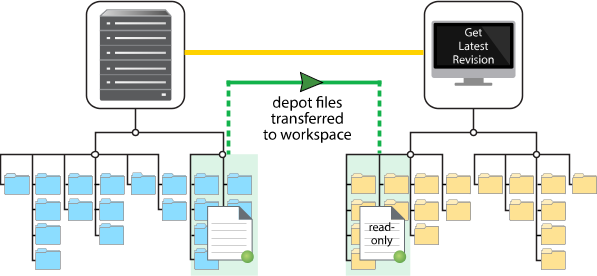
The next figure shows the mapping between depot files (shown on the left) and workspace files (shown on the right). Until files are checked out from the depot, they remain as read-only in the workspace. To have Helix Server update your workspace so that it reflects current work on the depot, synchronize your workspace to the depot by getting the latest revision of the files.
We have explained about checking files in and out of the depot, suggesting that single files may be checked in and out. In fact, the means we use to check files in and out of the depot is the changelist. A changelist must contain at least one file and may contain tens of thousands. A changelist is numbered and allows you to track all changes with respect to the contents of the depot: file modifications, the addition of a file, or the deletion of a file.
The changelist is the simplest way to organize your work. A changelists also represents the atomic unit of work in Helix Server: if a changelist includes several files, changes for all the files are committed to the depot or none of the changes are. For example, if a network connection between the client and the server fails during changelist submission, the entire submit fails.
Your search for returned result(s).


