Centralized and distributed architecture
Before you start to work with distributed versioning, it’s important to understand certain basic concepts — including distributed versioning architecture and how servers relate to one another in this architecture.
Solutions Overview: Helix Version Control System explains that version control systems can implement either a centralized model or a distributed model. Helix Server supports both of these models, as well as configurations that are a hybrid of the two.
In a centralized model, users interact directly with a shared server, checking out files, working in those files, and then checking them back in to the shared server.
The following diagram illustrates the centralized model:
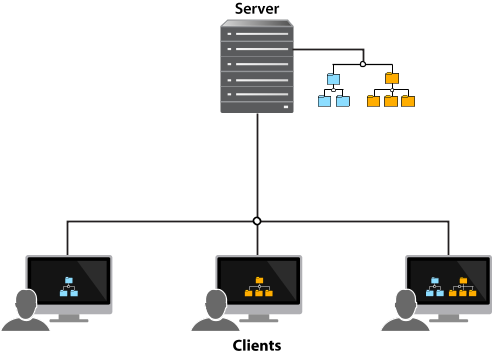
The client is a program — the Helix Server command line client, P4V, and P4Connect are some examples — that users interact with. Clients, in turn, interact with servers, which also interact with each other.
As you can see, some clients access subsets of the files stored on the shared server while others access all files stored on the server.
The distributed model gives users access to a repository of
archived files — and changes to those files — from a server running on
their local machine. This means that the entire history of a file
is contained on each user’s machine. A user can manage versioned content
without interacting with any other Helix Core Server, also called Helix Server or p4d, or even connecting to a network, unless desired. A user can also
rewrite and revise history to discard unwanted intermediate changes. The
distributed model allows users to work experimentally, to try out changes
and branch new streams, without interfering with others' work, and
without the need for a network connection.
The following diagram illustrates the distributed model:
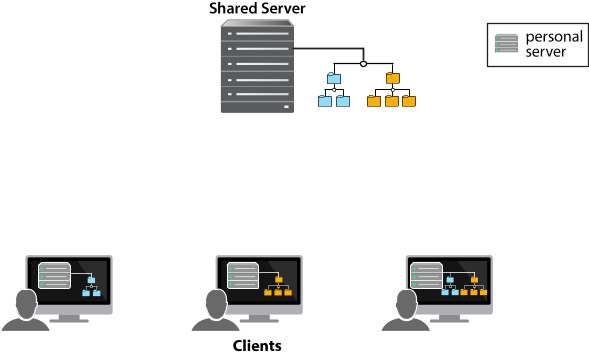
In the distributed model, a user can work on their individual server — disconnected from the network — until they’re ready to copy content to a shared server, making the content available to other users.
Moreover, unlike other version control systems — such as Git — users can copy a subset of the shared server’s content to the server on their own machine, rather than copying the entire shared server repository.
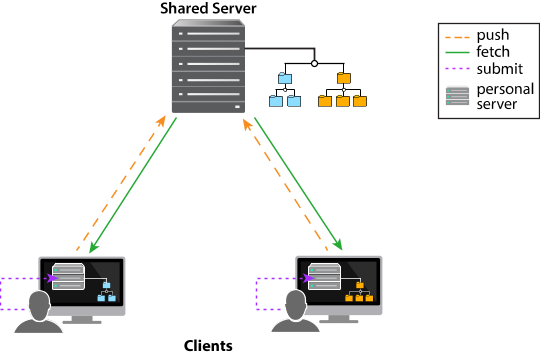
In this model, users first submit changes to their personal server and then push changes to a shared server. A different user can then fetch — that is, copy — those changes from the shared server to their personal server.
In the diagram below, each user is fetching just a subset of files: the user on the left is fetching just the blue files, while the user on the right is fetching just the orange files. Each client is submitting changes to its respective personal server and then pushing changes to and fetching changes from the shared server.
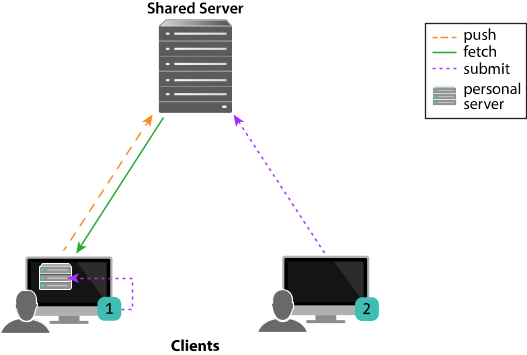
The distributed versioning model also provides a hybrid workflow that includes both centralized and distributed client-server relationships. The hybrid workflow allows users both to share their work with each other — by connecting their individual server to a shared server — and to interact directly with a shared server without an intervening individual server.
The following diagram illustrates a hybrid configuration:
In addition,
Helix Server
distributed versioning allows synchronization of content across multiple
offices or teams. You use the p4 fetch and
p4 push commands if the servers are networked or the
p4 zip and p4 unzip commands if
they’re not. Synchronization of content across sites is covered in the
"Managing Distributed Development" section of the
Helix Core Server Administrator Guide: Fundamentals.
Your search for returned result(s).


